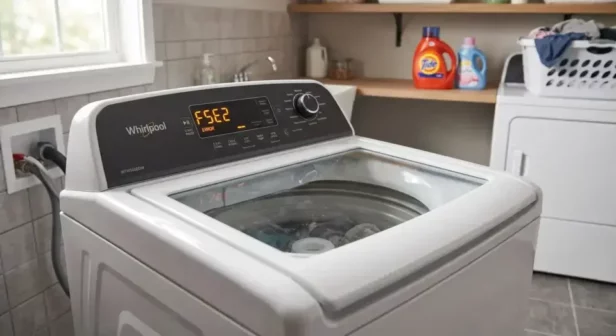
On washers documented by W11349355A, F5E2 is a lid-lock fault: the lock has not reached the locked position or its motor cannot be powered. Interference, an open lid-switch signal, or an inability to determine the lock state can lead to the fault.
Applies to: the Whirlpool top-load washer configuration documented in service sheet W11349355A. It does not supply universal instructions for all Whirlpool, Maytag, Amana, Kenmore, Cabrio, Bravos, or front-load washers. Check the full model number and its technical sheet first.
⚠️ SAFETY FIRST: Always unplug the appliance you're working on from the wall outlet, turn off the breaker, or both, to completely disable power before opening the top console or touching electrical wiring.
Make the situation safe
Disconnect power before opening panels, disconnecting connectors, or checking resistance or continuity. Never bypass the lid interlock or reach into a moving basket. Live electrical measurements belong to a qualified appliance-service professional following the complete OEM procedure. Drain the tub using the model’s approved method before underside access, and support the machine securely. Do not work beneath an unsupported tilted washer.
Check closure and visible interference
With the basket stopped, check that laundry is not trapped at the lid and that the lid closes normally. Inspect the visible strike for damage and the lock opening for debris without inserting tools or defeating the interlock. Do not force the lid, use a substitute strike, or assume repeated clicking proves the lock is defective.
Retrieve the stored fault before replacing parts
On the matching W11349355A configuration, use the following sequence with the washer fully assembled. Stop if there is uncontrolled filling, leakage near electrical equipment, severe mechanical movement, or a burning smell.
- Place the washer in standby: plugged in, with all indicators off. After initial power is applied, wait 10 seconds.
- Turn the cycle selector counterclockwise one or more clicks to reset the entry sequence. This does not erase stored faults.
- Within six seconds, turn clockwise one click three times, then counterclockwise one click, then clockwise one click. Allow about half a second between movements.
- Successful entry makes the status LEDs flash together, except Lid Locked. Turn the selector until only Done is illuminated, then press Start.
- Turn clockwise to review the four most recent stored faults. Record them before clearing anything.
If pump-out is active, diagnostics are unavailable until it completes. OEM W11349355A describes holding Start for three seconds to cancel pump-out before retrieving faults. Removing power pauses pump-out; it does not reset that condition. Use this step only when the washer can be operated safely.
Technician diagnosis: lock mechanism, connector, and harness
The following checks require the matching OEM sheet and safe access. Isolate power before connecting or disconnecting test leads or harnesses; resistance tests use the disconnected harness or isolated component specified by the OEM. Follow all live-measurement precautions in the sheet.
TEST #8 begins with the manual lid-lock functional test, then checks for binding and verifies the J6 connection with power disconnected. Inspect wiring and terminals for looseness, damage, or corrosion. A harness fault can imitate a lock failure. Replace only a component supported by the model-specific diagnosis.
Electrical pin assignments require source resolution
The reviewed W11349355A copy has conflicting J6 information: the resistance table on page 18 does not align with the circuit labels on page 12. This guide therefore does not provide a pin-specific lock-resistance test. Obtain the correct wiring diagram, corrected OEM information, or qualified service clarification for the actual washer before measuring the lock circuit. Do not transfer a coil range or pin number from a different lock design.
A lid that stays locked at the end of a cycle is an observation to record, not proof that the F5E2 lock command failed. Confirm the actual stored codes and model before choosing the next test.
Select parts only after confirmation
Use the complete model number, engineering revision, and confirmed failed component to select a replacement. A code alone does not prove that the named component is defective. Generic product photographs and a similar-looking part do not establish fitment.
Verify the repair
Reassemble all panels and reconnect every disturbed connection before normal operation. Correct any leak or mechanical hazard before running a test. On this documented configuration, select Automatic Test Mode from diagnostics with the Spin LED, then press Start; the lid must be closed and locked. The programmed test uses water. A pass illuminates the status LEDs for five seconds; a failure flashes them for five seconds. Retrieve any faults after a failed test and continue diagnosis.
Calibration and fault-history clearing are different operations. W11349355A limits Calibration Mode to models without level selection, and lists replacement of the main control, basket, drive assembly, suspension, motor, and capacitor as calibration triggers. Follow the relevant component-test procedure as well. Where required, use an empty basket, lid down, select Rinse in diagnostics, and press Start. Allow approximately two to four minutes without interruption; some configurations take longer.
To clear history after recording it, enter Fault Code Display Mode, turn to the flashing-status-LED position, and hold Start for three seconds. The sheet also removes a fault after five consecutive wash cycles without recurrence. Clearing history is not a repair or a calibration step.
OEM reference and applicability
Technical basis: Whirlpool W11349355A, F5E2 fault chart page 6; TEST #8 page 18; conflicting connector labels page 12. AFC’s library associates this sheet with WTW4816FW3 and WTW4850HW3. Match the technical sheet supplied with the complete model number and revision before using these procedures. A similar control panel does not establish applicability. The OEM sheet is intended for service technicians.
Document identifier: W11349355A. Use the appliance’s supplied sheet or obtain the applicable service document from Whirlpool. Exact electrical test conditions and component access are part of the procedure, not optional details.